Welcome to the Youforce Domein API Postman Collection, designed to help you seamlessly integrate with our platform and access the sandbox environment.
Follow these steps to begin your integration journey:
1.- First of all, you need some credentials to identify yourself. You can get them through the Visma Connect portal.
2.- Start by opening your Postman application and make sure you are logged in with your Postman account.
3.- Navigate to the Youforce Domein API Collection.
4.- Fork the Collection into your workspace:
- Click on the collection you want to get.
- In the right, you'll see three dots appear. Click on them and you will see a menu expanding.
- Select 'Fork' option and a menu will appear.
- Select the workspace where the collection will be created.
- Don't forget to click the tick for the notifications so you are informed of all the updates.
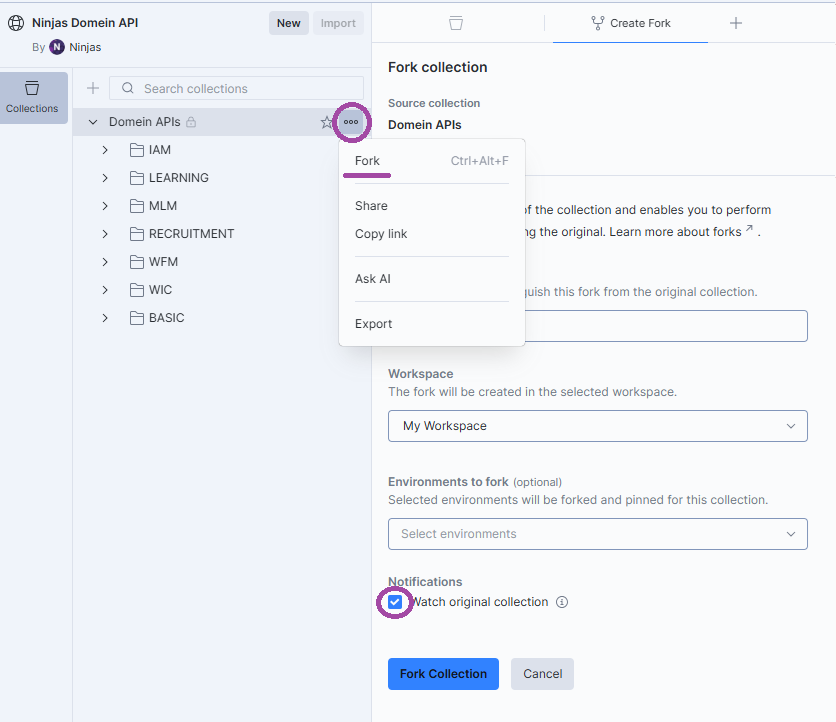
As we continually improve our API, we highly recommend that you keep the Notifications on so you can pull the updates from the main collection. This way, you’ll stay up-to-date with the latest features and enhancements.
You now have your own branch of the collection that you can modify without affecting the original.
Once you have the collection and environment settings, you can start making API calls to our sandbox environment for testing and development purposes.