1. Overview
Domain Purpose:
With the Recruitment API, you can integrate recruitment and ATS (Applicant Tracking System) applications with Youforce. This allows you to exchange relevant information about a candidate to be hired from your ATS application with Youforce. This way, you don’t have to re-enter data or re-upload existing documents. The Recruitment API also kicks off the Youforce Self-service workflow, ensuring all new employee information is captured in a single, streamlined process.
Additionally, the ATS system can leverage Youforce’s relevance for internal mobility and connect relevant stakeholders (e.g., interviewers) to a vacancy.
Typical Use Cases:
- As a recruiter I want to start the onboarding process in the core system for the candidate we have selected for a vacancy
- As a recruiter I want to involve the manager and a current employee of the relevant organization unit to participate in the selection process
- The API can check if the candidate already has a personal number so there will be no double entries in the HR-system of the same person
Base URL:
https://api.youforce.com/recruitment
Swagger page:
For more detailed information about the endpoints available in this API, please visit the Youforce recruitment API Swagger page
Postman collection:
For a complete example, you can check our Postman collection
2. Domain model
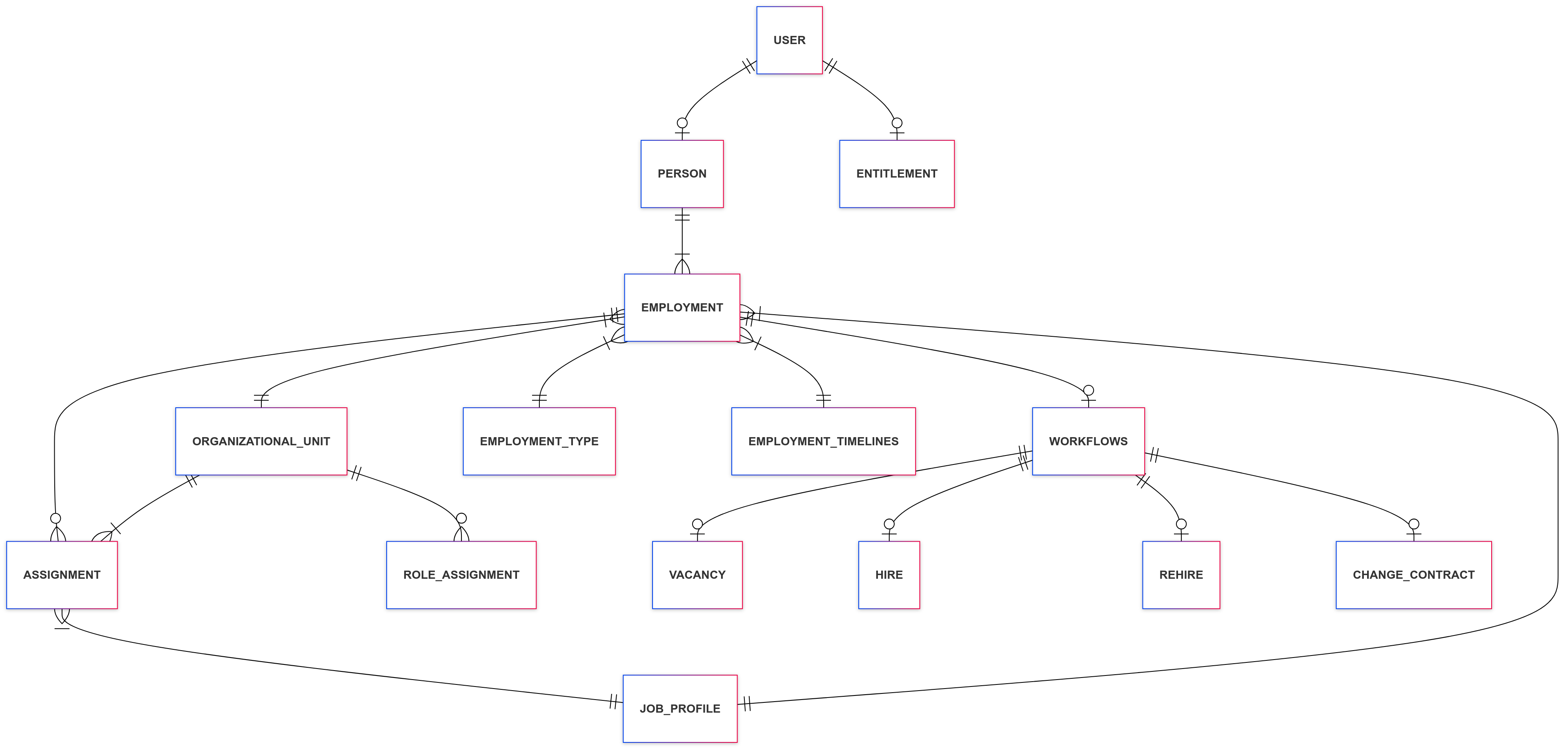
3. Included entities
This is the list of available endpoints for this domain.
Take into account that the endpoints will show the information that has been already processed by HR Core. This means that changes in the recent future might be shown in the response of the APIs and not the current value.
| Entity | Description | Access capabilities |
|---|---|---|
| Assignments | Allocation of specific tasks or duties to an employee within an employment. For example, an employee is assigned to a different department as a temporary replacement or to help another department without changing his own employment. HR Core: Inzet | READ |
| Employments | The formal relationship between an employer and an employee regarding their job position. A person can have multiple employments at the same time. HR Core: Dienstverband | READ |
| Employment Timelines | The chronological sequence of events in the past pertaining to an individual’s employment within an organization, including start and end dates. It is based on the history table of HR Core. The endpoint contains the same fields as the endpoint employments. HR Core: Dienstverband Historie | READ |
| Employment Types | Show details of the employment types. HR Core: Soort Arbeidsrelatie | READ |
| Entitlements | Different users that have a certain entitlement. | READ |
| Job Profiles | Different profiles or functions existing for each role within the company. HR Core: Functie | READ |
| Organization Units | Distinct business units, departments, divisions, etc within a larger organization that represent functional or geographical areas and how these are related to each other. HR Core: Organisatie eenheden | READ |
| Persons | An individual employee or worker within the organization, including some personal details. This could also contain people without (active) employment. Additionally, if the person has an employment which is out of the historicaldays, then the person won’t be retrieved neither. HR Core: Persoon | READ |
| Person Timelines | The chronological sequence of processed events in HR Core pertaining to a person within an organization. It is based on the history table of HR Core. The endpoint contains the same fields as the endpoint persons. HR Core: Persoon Historie | READ |
| Role Assignments | Allocation of specific roles or responsibilities to a person within the organization. The role assignment describes “who” is responsible for “what“ and “when“ within the organization unit. HR Core: Rol toewijzing | READ |
| Users | Individuals with unique identifiers who have access to an organization’s systems, resources or data and their entitlements. Youforce User account. | READ |
| Workflows | A defined series of tasks or steps to complete a business process, like hire, re-hire or change an existing contract. | READ WRITE |
3.1 Vacancy endpoint
The Vacancy entity is the trigger of the recruitment process. Within the HR Core module, HR Self Service (HSS) managers start a vacancy based on an open position or an additional staffing need. Once a vacancy is approved by the company in HSS, it becomes the starting point for one or multiple recruitment cases (single or multiple employees).
The Recruitment API vacancy endpoint exposes this vacancy data to external recruitment systems so that:
- new vacancies can be published for recruitment, and
- existing vacancies can be kept in sync when they are updated in HR Core Self Service.
| Aspect | Detail |
|---|---|
| Operation | Export of vacancies (created and updated) |
| HTTP method | GET — used for both new vacancies and updates to existing vacancies |
| Idempotency key | VacancyCode (unique within the tenant) |
| Direction | Outbound from HR Core Self Service → consuming recruitment system |
Note on updates: the vacancy can be edited after initial publication (HSS provides a vacancy overview with edit capability). Integrators should treat repeated
GETcalls with the sameVacancyCodeas an upsert: if the code is unknown, create the vacancy; if it already exists, apply the payload as an update.
Vacancy fields
The vacancy entity contains general information (code, title, etc.), job-related information (job profile, job level, organizational unit, etc.), and process information (start/end date, number of positions required).
| Attribute | Description | Type | Example | HR Core Self Service field (default) |
|---|---|---|---|---|
VacancyCode |
Unique vacancy number in HR Core Self Service. This job request number is unique within the tenant. | string | VAC0012 |
VC0001 – vacature nummer |
Title |
Title of the vacancy. | string | Case manager |
VC0017 – Vacature titel |
organizationUnit |
Logical code of the organization unit; logical reference to the organization unit entity. Note: in HSS this is the technical ID of the org unit — the API translates it into the logical code. | string | HR01 |
VC0002 – organisatie eenheid |
payrollCompany |
Logical code of the company; reference to the company entity. | string | B01 |
VC0020 – employer |
recruitmentChannel |
Channel in which the recruitment system will publish the job request (e.g. internal only, external only, both, or a specific employment agency). Reference table is customer-specific and needs to be aligned with the recruitment system. | string | extern |
VC0009 – Intern/Extern werven (values: Intern, Extern) |
recruitmentReason |
Reason for the new position: new position, extension of an existing position, or replacement of an existing person. | string | Replacement |
VC0023 – Recruitment reden (values: 1 = Vervanging, 2 = Uitbreiding) |
experienceLevel |
Required experience level, e.g. 0-3 years, 4-6 years, 7-10 years, over 10 years. | string | 4-6 |
VC0021 – Ervaringsniveau (values: under3years, under6years, under10years, over10years) |
jobProfile |
Logical code of the job profile; reference to the job profile entity. | string | CMAN |
VC0003 – Functie |
jobLevel |
Required level of the job, e.g. Junior, Medior, Senior. Reference table is customer-specific and needs to be aligned with the recruitment system. | string | — | VC0004 – functie niveau |
jobFamily |
Job family code or job family title. | string | HR |
VC0018 – functiehuis titel |
employeeType |
Type of employee. | string | Intern |
VC0005 – type medewerker |
amountHoursWeek |
Amount of hours per week. | number | 40,00 |
VC0006 – uren per week |
contractType |
Contract type: temporal or indefinite. | string | temporal |
not available |
salaryIndication |
Indication for the salary: a range (e.g. 1500–1800 euro), a maximum (e.g. max 2000 euro), or a scale (e.g. Schaal 10). | string | Schaal 10 |
VC0022 – Salaris Indicatie |
contractualDuration |
Only relevant when contractType is temporal, e.g. 6 months, 1 year. |
string | 1 year |
not available |
establishmentUnit |
Logical code of the location/establishment unit where the work is performed; mainly follows the contractual arrangement. | string | AMS |
not available |
numberOfPositionsRequired |
Total number of positions required for the job request. | number | 5 |
VC0007 – aantal te vervullen posities |
numberOfPositionsCompleted |
Number of positions already filled. | number | 1 |
VC0008 – Aantal reeds vervuld |
ApprovalDate |
Approval date of the job request. | date | 2020-12-20 |
VC0010 – Datum initieel goedgekeurd |
startDate |
Start date of the job request. | date | 2021-01-01 |
VC0011 – Start datum vacature |
endDate |
End date of the job request. | date | 2021-04-01 |
VC0016 – Vervaldatum vacature |
owner |
Owner/manager of the job request. | string | J. Janssen |
VC0019 – vacature houder |
ownerEmailAddress |
Email address of the owner of the job request. | string | j.jansen@visma.com |
VC0025 – Email adres vacature houder |
Note:
ownerandownerEmailAddressare personal data under GDPR/AVG. Consumers must transmit and store this data encrypted (TLS in transit, encryption at rest) and must not log or persist it in plain text.
Retention policies
Every vacancy that has an end date set becomes subject to a visibility window: once that end date, plus your tenant’s configured retention period for the recruitment domain, has passed, the vacancy stops being returned by the GET endpoint.
Vacancies with no end date are open-ended and are never hidden this way — they remain visible indefinitely.
The retention period is configured per tenant and can change. If it’s shortened, a vacancy that was previously visible can disappear from the output with no other change having happened to the vacancy itself. If it’s widened, a previously-hidden vacancy can reappear. If you rely on a vacancy still being retrievable, don’t assume today’s visibility will hold indefinitely — if you need a long-term record, capture the data on your side while it’s still visible.
Independently of the above, a vacancy record is permanently and irreversibly deleted 5 years after its end date, regardless of whether it had already stopped appearing in the output before that point. Once this happens, there is no way to retrieve the record again.
If the vacancy is deleted at its source our platform marks it as deleted. For the following 7 days, the vacancy continues to appear in the normal GET output, but with isDeleted: true, so you can detect and react to the deletion. After those 7 days, the record is permanently removed and will no longer be returned at all.
3.2 Hiring / Rehiring process
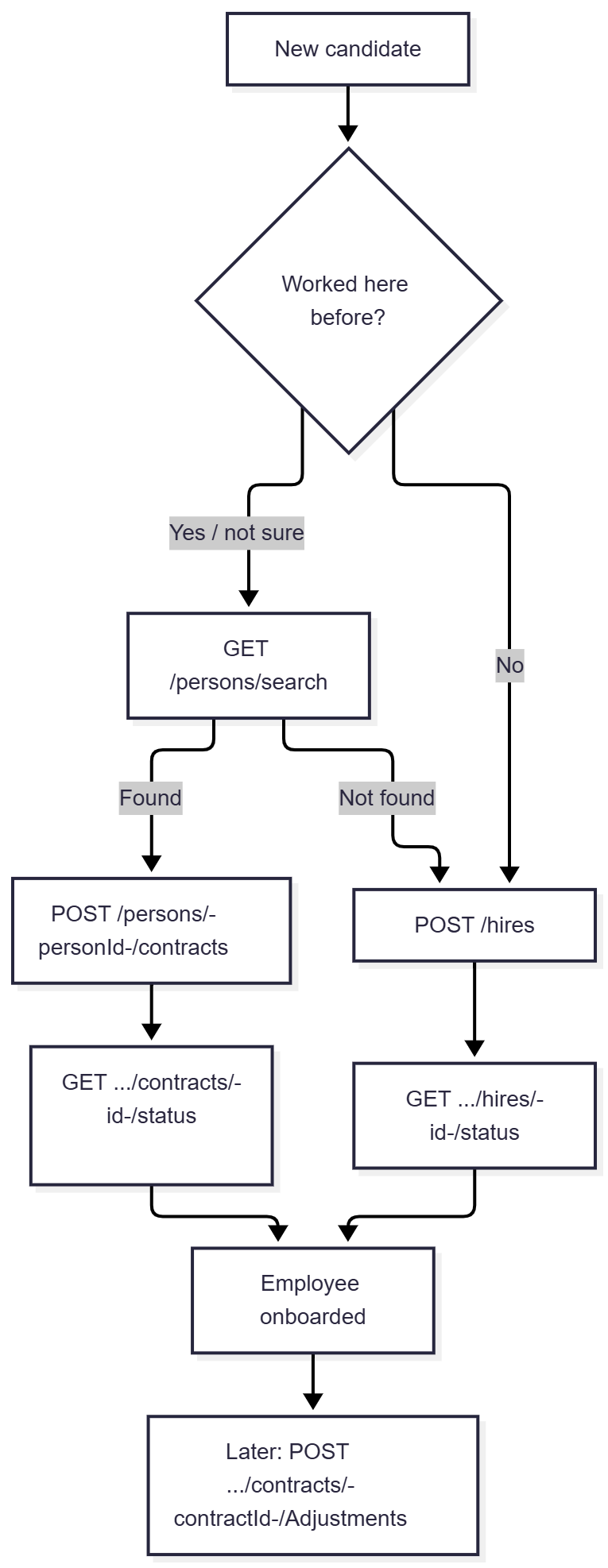
Onboard a new employee, or create a new contract for someone who has worked for the organization before. All actions are asynchronous: your request is accepted immediately, and you then poll a status endpoint to find out what actually happened.
The process
- New hire — if this is a brand-new person, submit a hire directly.
- In case of a rehire — if the candidate have worked here before, search for them first using a small set of identifying fields.
- Rehire — if found, create a new contract for that existing person instead of creating a duplicate.
- Later changes — once someone is hired, changes to their contract (job, hours, salary, etc.) go through a separate contract-adjustment call, not through the hire endpoint again.
Targeting a specific workflow: X-Raet-Workflow
Every POST action below supports an optional X-Raet-Workflow header, letting you target a specific workflow configured for your tenant for that one call, instead of using the default. Some actions may support their own specific set of workflow names — check with your implementation contact for the values available to you.
Attachment rules
Apply to the files array on every endpoint below that accepts it:
- The combined size of all attachments in a single request must not exceed 23 MB.
- File names may only contain: uppercase letters (
A–Z), lowercase letters (a–z), numbers (0–9), and the symbols space,+,-,_,(,),[,],{,},.,:,;.
1. Hire a new employee
POST /{domain}/v1.0/hires
Request body — key fields
| Field | Required | Notes |
|---|---|---|
candidateID |
Required | The candidate’s ID in the recruitment system. |
lastName, lastNameAtBirth, lastNameAtPrefix, knownAs, initials, firstNames |
Optional | Name components. |
gender |
Optional | 1 = Male, 2 = Female, 0/9 = not specified. |
birthDate, birthPlace, birthCountry, primaryNationality |
Optional | |
titlePrefix, titleSuffix |
Optional | e.g. “Dr.”, “MSc”. |
maritalStatus, lastNamePreference, lastNamePartner, partnerNamePrefix |
Optional | |
socialSecurityNumber |
Optional | Sensitive data — handle accordingly in your own systems. |
phoneNumbers.phoneNumberHome / .phoneNumberMobile |
Optional | |
emailAddress |
Optional | |
addresses.homeAddress / .postalAddress |
Optional | Each: street, number, numberAdditional, postalCode, city, country. |
vacancyNumberHR, vacancyNumberATS, offerApproveDate |
Optional | Application/vacancy reference details. |
employmentDetails.payrollClientCode |
Required | |
employmentDetails.payrollInstitutionCode |
Required | |
employmentDetails.hireDate |
Required | |
employmentDetails.employeeType |
Required | |
employmentDetails.contractType |
Required | Indefinite vs. fixed-term. |
employmentDetails.organizationUnit |
Required | |
employmentDetails.jobProfile |
Required | |
employmentDetails.amountOfHours |
Required | |
employmentDetails.endDate, .originalHireDate, .collectiveLaborAgreement, .establishmentUnit, .probationPeriod, .probationPeriodDuration, .probationPeriodEnddate, .parttimePercentage |
Optional | |
salaryDetails.salary |
Optional | Flat agreed salary amount. |
salaryDetails.hourlyRate |
Optional | For contracts paid an hourly rate. |
salaryDetails.payScale / .payScaleStep / .payScaleAmountNo |
Optional | For scale-based contracts. |
benefits |
Optional | [{ "benefitCode": "...", "value": "..." }] — other agreed benefits. |
customFields |
Optional | [{ "fieldCode": "...", "fieldValue": "..." }] — for any additional field not covered above. |
assignments |
Optional | [{ startDate, endDate, assignmentType, organizationUnit, jobProfile, amountOfHours }] — create an assignment alongside the hire. |
files |
Optional | [{ "name": "...", "contentBase64": "...", "category": "..." }] — attachments, base64-encoded; see Attachment rules above. category is optional. |
Example — minimal hire
POST /{domain}/v1.0/hires

{
  "lastNameAtBirth": "Smit",
  "lastNameAtPrefix": "van de",
  "knownAs": "Alex",
  "initials": "AS",
  "firstNames": "Alexander Simon",
  "gender": 1,
  "birthDate": "1985-06-15",
  "emailAddress": "alex.smith@example.com",
  "employmentDetails": {
    "payrollClientCode": "23625",
    "payrollInstitutionCode": "1",
    "hireDate": "2023-10-01",
    "employeeType": "V",
    "organizationUnit": 914,
    "jobProfile": "17",
    "amountOfHours": 20
  }
}
Response — 202 Accepted
{ "id": "fede49ce-7043-482d-aba8-152478712c4b" }
Keep this id to check the outcome (see below).
2. Check if the candidate already exists (before a rehire)
GET /{domain}/v1.0/persons/search
Only use a small, necessary set of search fields — this endpoint is deliberately limited for privacy reasons. Available fields: lastNameAtBirth, lastNameAtBirthPrefix, birthDate, birthPlace, knownAs.
GET /{domain}/v1.0/persons/search?lastNameAtBirth=VERWAAL&birthDate=1980-03-19
If a match is found, use that person’s id for the rehire call below instead of creating a new hire.
3. Rehire — new contract for an existing person
POST /{domain}/v1.0/persons/{personId}/contracts
Same request body fields as a new hire (§1). {personId} comes from the search above.
If the person has an active contract this rehire relates to, you can additionally identify it via:
| Field | Notes |
|---|---|
currentEmployment.personCode |
Optional. |
currentEmployment.employmentCode |
Optional. |
Response: 202 Accepted with { "id": "..." }, same as a new hire.
4. Change an existing contract
POST /{domain}/v1.0/persons/{personId}/contracts/{contractId}/Adjustments
For changes to a contract that’s already active — job profile, hours, salary, or ending it.
| Field | Notes |
|---|---|
effectiveDate |
Required. When the change takes effect. |
employeeType, contractType, organizationUnit, jobProfile, amountOfHours, parttimePercentage |
Same meaning as on a hire. |
endDate |
Set this to end the contract as part of the change. |
salaryDetails |
Same shape as a hire. |
customFields, files |
Same shape as a hire; attachments follow the same rules above. |
POST /{domain}/v1.0/persons/35002/contracts/1/Adjustments

{
  "effectiveDate": "2024-01-01",
  "employeeType": "V",
  "contractType": "01",
  "organizationUnit": 914,
  "jobProfile": "4000",
  "amountOfHours": 20,
  "salaryDetails": {
    "payScale": "10",
    "payScaleStep": "4"
  }
}
Response: 202 Accepted with { "id": "..." }.
5. Checking the outcome
Every POST above is asynchronous. Poll the matching status endpoint using the id you got back:
| Action | Status endpoint |
|---|---|
| Hire | GET /{domain}/v1.0/hires/{id}/status |
| Rehire | GET /{domain}/v1.0/persons/{personId}/contracts/{id}/status |
| Contract adjustment | GET /{domain}/v1.0/persons/{personId}/contracts/{contractId}/adjustments/{id}/status |
Example response
{
    "id": "f42a3ec1-96cf-4ae1-94fa-ba68a6e0e57a",
    "status": "Completed",
    "workflowName": "YF API - Nieuwe Medewerker",
    "startActivity": "Youforce API",
    "startButton": "verzenden",
    "hrssWorkflowStatus": {
        "data": {
            "companyId": "4028868",
            "isActive": true,
            "currentActivity": "Aanvullen LG",
            "endStatus": "InProgress",
            "endStatusName": "",
            "workflowInstanceId": 1063367
        },
        "workflowInstanceId": 1063367
    }
}
| Field | Meaning | Possible values |
|---|---|---|
status |
Whether your request was successfully submitted. "Completed" does not mean the workflow itself has finished — keep reading. |
InProgress, Completed, Error, InternalError |
hrssWorkflowStatus.data.isActive |
Whether the workflow is still running. | true / false |
hrssWorkflowStatus.data.currentActivity |
The step the workflow is currently at. | Defined by your organization’s workflow setup. |
hrssWorkflowStatus.data.endStatus |
The field to check for the actual outcome. | OK, NOK, InProgress |
Recommended check for “is this actually done”: poll until hrssWorkflowStatus.data.isActive is false, then read endStatus for the result.
Notes
customFieldslets you pass additional values not covered by the named fields above, if agreed with your implementation contact.
4. Security and Scopes
All available endpoints are secured using OAuth 2.0 and protected by scopes.
| Scope | Description | Affected endpoints |
|---|---|---|
| Youforce-Recruitment:Get_Basic | Grants access to basic employee & organisation data | GET /v1.0/assignments GET /v1.0/employments GET /v1.0/employments/timelines GET /v1.0/employmentTypes GET /v1.0/entitlements/{entitlement}/users GET /v1.0/jobProfiles GET /v1.0/organizationUnits GET /v1.0/persons GET /v1.0/persons/timelines GET /v1.0/roleAssignments GET /v1.0/users |
| Youforce-Recruitment:GetPrivateContactDetails | Grants access to the private contact details of the employees | GET /v1.0/persons GET /v1.0/persons/timelines Extra fields shown: social security number, addresses, e-mail addresses (business and private) and phone numbers (business and private) |
| Youforce-Recruitment:HSS_startWorkflow | Start HSS workflow for Hire, re-hire and contract change | GET /v1.0/vacancies POST /v1.0/hires GET /v1.0/hires/{StatusId}/status POST /v1.0/persons/{PersonId}/contracts GET /v1.0/persons/{PersonId}/contracts/{StatusId}/status POST /v1.0/persons/{PersonId}/contracts/{ContractId}/adjustments GET /v1.0/persons/{PersonId}/contracts/{ContractId}/adjustments/{StatusId}/status |
5. Pagination & Filtering parameters
Learn how to efficiently manage large amounts of information by using pagination and filtering parameters to improve performance and user experience.
Pagination Parameters:
These parameters control the pagination of API results:
- take: Use this parameter to retrieve a certein amount of registers per call, being the minimun value 1 and the maximum value 1000.
- skip: Use this parameter to skip a certein amount of records. Use it for offset-based pagination.
- nextLink: For large paginated responses, if there are more registers than shown in the output, we will provide a continuation token that you can use in the next call to get the next page.
Date Filtering Parameters:
The latestSync field in the response reflects the last synchronization datetime (creation or modification dates) we stored because we received an update from the HRCore. So it is not related to the dischargedate value.
These parameters filter records based on this latestSync field:
- from: Use this parameter to filter records based on creation or last modification dates and retrieve records which modification date is greater or equal to the value in the filter → records that have latestSync datetime >= from
- to: Use this parameter to filter records based on creation or last modification dates and retrieve records which modification date is less or equal to the value in the filter → records that have latestSync datetime <= to
Filters on validity of a record:
- validOn: Use this parameter to filter temporal entities that are valid on a specific date (e.g., contract validity based on its start and end dates).
This filter is meant to be used in combination with From and To parameters. For example, with From and To you will get the Employments that are modified in a specific range, and with validOn you will limit the response to the records that are active on a specific date.
Available endpoints: timelines, assignment and role assignment endpoints.
Other Parameters:
-
isActive: Use this parameter to distinguish between active or deleted records. Active means that it is still in the HR Core database but it has not been deleted from there. It doesn’t correspond to the block field in HR Core.
Available for all endpoints.
Example 1:
- we have a record that is active (not deleted in HR Core)
- today is 01/12/2025
- historical days is set at 60 days in the subscription (Configuration API)
- the discharge date is 01/11/2025 (within the historical days window)
→ then the record will be returned in the API
Example 2:
- we have a record that is active (not deleted in HR Core)
- today is 01/12/2025
- historical days is set at 15 days in the subscription (Configuration API)
- the discharge date is 01/11/2025 (outside the historical days window)
→ then the record will NOT be returned in the API
Example 3:
- the record has been deleted on 01/12/2025 from HR Core (it is not active)
- today is 01/12/2025
- historical days is set at 75 days in the subscription (Configuration API)
- the discharge date is 01/11/2025 (within the historical days window)
- It is within the 7 days after its deletion and:
- the filter isActive is true → then the record will NOT be returned in the API
- the filter isActive is false → then the record will be returned in the API
- the filter isActive not provided → then the record will be returned in the API
Example 4:
- the record has been deleted on 10/11/2025 from HR Core (it is not active)
- today is 01/12/2025
- historical days is set at 75 days in the subscription (Configuration API)
- the discharge date is 01/11/2025 (within the historical days window)
- it is not within the 7 days after its deletion
→ then the record will NOT be returned in the API (regardless of the value of isActive parameter) - personId, personCode: Use one of these parameters to filter indistinctly by the code of an specific individual.
Available endpoints: Assignment, CostAllocation, Person, RoleAssignment and PlannedChanged. - company: Use this parameter to filter by company field.
Available endpoints: Employment. - organizationUnit: Use this parameter to filter by department or team structure.
Available endpoints: Employment. - shortName: Use this parameter to filter by the short name of an organization unit or job profile depending on the endpoint.
Available endpoints: JobProfile, RoleAssignment and OrganizationUnit. - employmentType: Use this parameter to filter by the employment type code.
Available endpoints: Employment.
7. Deprecated Endpoints
List of Deprecated Routes:
- GET /v1.0/EmploymentTimelines:
This behavior has been incorporated as part of the Employments endpoint –> GET /v1.0/Employments/Timelines - GET /v1.0/EmploymentTimelines/{id}:
This behavior has been incorporated as part of the Employments endpoint –> GET /v1.0/Employments/Timelines/{id}