1. Overview
Domain Purpose:
The purpose of this API is to add addtional fields to an existing domain API. With this API customers can customize the integration with their external system, like their IAM or learning system Customization means adding custom fields to the domain api on Person, Employment, Job Profile or Organization Unit entities.
Extensions are always configured for a specific Application and customer. The Application needs to exist before the additional field can be added. Adding extension needs to be done by Visma Raet as part of the onboard of an application for specific customer.
Typical Use Cases:
Base URL:
https://api.youforce.com/extensions/v1.0/{domain}/{entity}
Available domains: IAM, Learning, MLM, Recruitment, WFM, WIC, Basic and Enterprise.
For Basic domain, there are no Person Extension Timelines & Employment Extension Timelines endpoints.
Swagger page:
For more detailed information about the endpoints available in this API, please visit the Youforce extensions API Swagger page
Postman collection:
For a complete example, you can check our Postman collection
2. Domain model
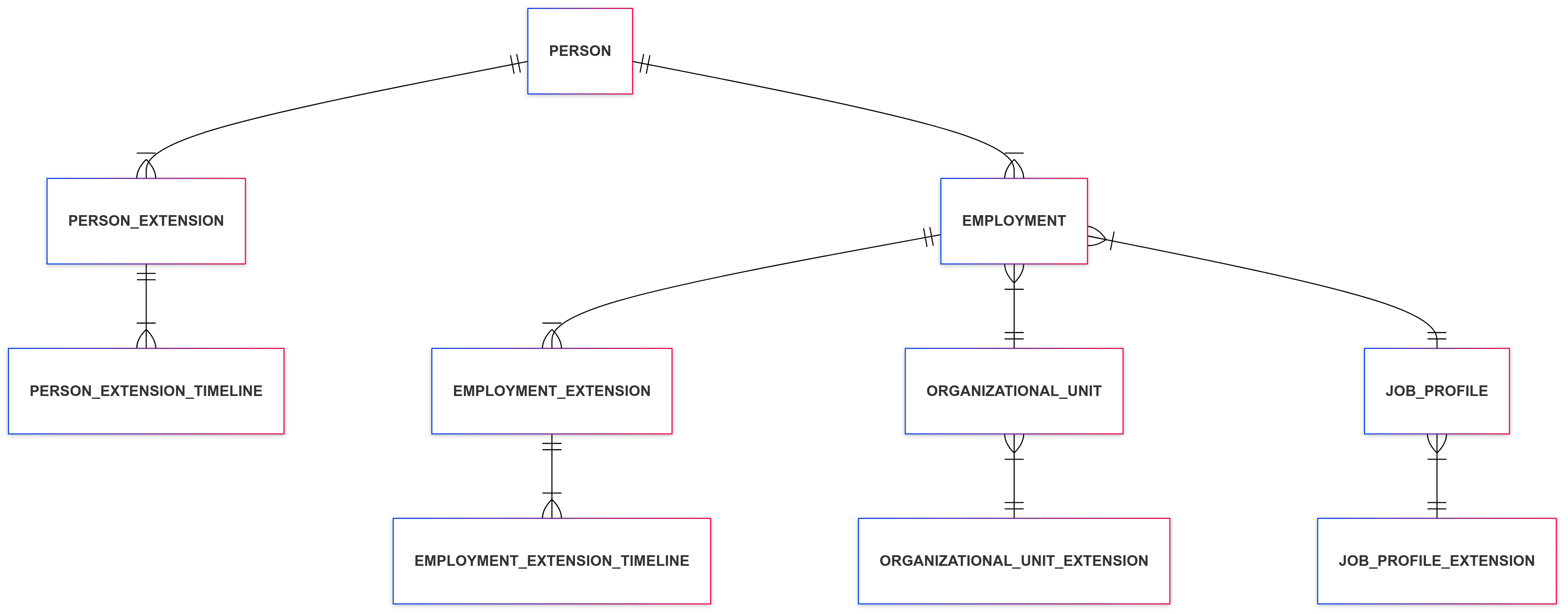
3. Included entities
| Entity | Description | Access capabilities |
|---|---|---|
| Person Extensions | Flexible fields or own categories associated with a person. The data type must be PS - Persoon and it must be a ‘Master data’. | READ WRITE |
| Person Extension Timelines | Specific timelines in the past detailing the start and end dates of person extensions. | READ |
| Employment Extensions | Flexible fields or own categories associated with an employment. The data type must be DV - Dienstverband and it must be a ‘Master data’. | READ WRITE |
| Employment Extension Timelines | Specific timelines in the past detailing the start and end dates of employment extensions. | READ |
| Employment Extension Planned Changes | Changes in employment extensions that will come in the future detailing the start and end dates of the change. In case there is no current value (only future ones), the field which contains the current value will be returned as null and the future mutations in an array. Only available for WFM and Enterprise domains. | READ |
| Job Profile Extensions | Flexible fields or own categories associated with a job profile. The data type must be FU - Functie and it must be a ‘Master data’. | READ |
| Organization Unit Extensions | Flexible fields or own categories associated with an organization unit. The data type must be OE - Organisatie Eenhed and it must be a ‘Master data’. | READ |
4. Security and Scopes
All available endpoints are secured using OAuth 2.0 and protected by scopes.
| Scope | Description | Affected endpoints |
|---|---|---|
| Youforce-Extensions:Get_Basic | Grants access to basic extensions data | GET /extensions/v1.0/{domain}/persons GET /extensions/v1.0/{domain}/persons/timelines GET /extensions/v1.0/{domain}/employments GET /extensions/v1.0/{domain}/employments/timelines GET /extensions/v1.0/{domain}/employments/plannedchanges GET /extensions/v1.0/{domain}/jobprofiles GET /extensions/v1.0/{domain}/organizationunits |
| Youforce-Extensions:Write_Data | Grants access to write data back to the Core like Person extensions or Employment extensions | PATCH /extensions/v1.0/{domain}/persons/{id} PATCH /extensions/v1.0/{domain}/employments/{id} |
5. Pagination & Filtering parameters
Pos 1: Learn how to efficiently manage large amounts of information by using pagination and filtering parameters to improve performance and user experience.
Pos 2: Discover the available query parameters to control pagination and filter results effectively in your API requests.
Pagination Parameters:
- take: Use this parameter to retrieve a certein amount of registers per call, being the minimun value 1 and the maximum value 1000.
- skip: Use this parameter to skip a certein amount of records. Use it for offset-based pagination.
- nextLink: For large paginated responses, if there are more registers than shown in the output, we will provide a continuation token that you can use in the next call to get the next page.
Date Filtering Parameters:
The latestSync field in the response reflects the last synchronization datetime (creation or modification dates) we stored because we received an update from the HRCore. So it is not related to the dischargedate value.
These parameters filter records based on this latestSync field:
- from: Use this parameter to filter records based on creation or last modification dates and retrieve records which modification date is greater or equal to the value in the filter → records that have latestSync datetime >= from
- to: Use this parameter to filter records based on creation or last modification dates and retrieve records which modification date is less or equal to the value in the filter → records that have latestSync datetime <= to
Filters on validity of a record:
- validOn: Use this parameter to filter entities that are valid on a specific date (e.g., contract validity). This filter is meant to be used in combination with From and To parameters. For example, with From and To you will get the Employments that are modified in a specific range, and with validOn you will remove the periods of that entity that are outside the range between startDate and endDate.
Other Parameters:
-
isActive: Use this parameter to distinguish between active or deleted records. Active means that it is still in the HR Core database but it has not been deleted from there. It doesn’t correspond to the block field in HR Core. Example 1:
- we have a record that is active (not deleted in HR Core)
- today is 01/12/2025
- historical days is set at 60 days in the subscription (Configuration API)
- the discharge date is 01/11/2025 (within the historical days window)
→ then the record will be returned in the API
Example 2:
- we have a record that is active (not deleted in HR Core)
- today is 01/12/2025
- historical days is set at 15 days in the subscription (Configuration API)
- the discharge date is 01/11/2025 (outside the historical days window)
→ then the record will NOT be returned in the API
Example 3:
- the record has been deleted on 01/12/2025 from HR Core (it is not active)
- today is 01/12/2025
- historical days is set at 75 days in the subscription (Configuration API)
- the discharge date is 01/11/2025 (within the historical days window)
- It is within the 7 days after its deletion and:
- the filter isActive is true → then the record will NOT be returned in the API
- the filter isActive is false → then the record will be returned in the API
- the filter isActive not provided → then the record will be returned in the API
Example 4:
- the record has been deleted on 10/11/2025 from HR Core (it is not active)
- today is 01/12/2025
- historical days is set at 75 days in the subscription (Configuration API)
- the discharge date is 01/11/2025 (within the historical days window)
- it is not within the 7 days after its deletion
→ then the record will NOT be returned in the API (regardless of the value of isActive parameter) -
personId, personCode: Use one of these parameters to filter indistinctly by the code of an specific individual.